Resources
IFU – Heart Rhythm SDK
User Manual
V1.4.0
| Record ID: | MDRTH-IFU-H |
|---|---|
| Record Revision: | D |
| Record Issue Date: | 06.10.2026 |
Product
Name: Cardiovascular Monitoring Application Software
Model: Heart Rhythm SDK
Basic UDI-DI: 08720299815001
UDI-PI: V1.4.0-D20240917
Electronic Instructions for Use
These Instructions for Use are provided in electronic form within the Heart Rhythm SDK application, in accordance with Commission Implementing Regulation (EU) 2021/2226, as amended by Regulation (EU) 2025/1234 on electronic instructions for use of medical devices.
The most current version of the Instructions for Use is accessible within the app and at: www.happitech.com.
The Instructions for Use are served via a static link embedded in the application. Users always access the current version directly when opening the IFU within the app; no local copy is cached and no user action is required to receive updated content.
A paper copy of the Instructions for Use is available free of charge upon request. To request a paper copy, contact Happitech B.V. at info@happitech.com. Happitech will provide the paper copy within 7 calendar days of receiving the request.
The content of the electronic Instructions for Use is equivalent to any paper version provided. In the event of any discrepancy, the electronic version within the app shall be considered the current authoritative version.
Introduction
Product Description
Heart Rhythm SDK is a software-only mobile medical application that is intended to be used with iOS and Android smartphone cameras to measure heart rate, heart rate variability, and heart rhythm data. The device analyzes and displays this data in graphic form that can be used to provide information for identifying atrial fibrillation and sinus rhythm, and transmits the information for remote review.
Intended Purpose
Heart Rhythm SDK is a software-only mobile medical application intended for use with iOS and Android smartphone cameras to measure heart rate, heart rate variability, and heart rhythm (including atrial fibrillation and normal sinus rhythm). The software analyzes and displays the data in graphical form and may transmit the information for remote review.
Heart Rhythm SDK is classified as Software as a Medical Device (SaMD). It can function as a standalone mobile application or be integrated into Digital Health and Telehealth applications to support telemonitoring and remote patient management.
The Heart Rhythm SDK is a compiled software library that provides a SaMD solution without additional hardware dependency. It utilizes photoplethysmography technology to capture the pulse rhythm and analyze heart rate and rhythm parameters.
Heart Rhythm SDK is intended for monitoring and screening for atrial fibrillation. It is indicated for self-testing by patients who have been diagnosed with, or are at risk of developing, atrial fibrillation and who wish to monitor and record their heart rhythms on an intermittent basis.
General Safety Information
Heart Rhythm SDK is not an emergency service. In the event of acute or concerning symptoms, the user must seek immediate medical attention. The software is not intended to be used for diagnosis or treatment of a medical condition. Users are advised to consult a qualified healthcare professional regarding any questions or concerns related to their health status.
Product features (Functional description)
The Heart Rhythm SDK can measure heart rate, heart rate variability, and heart rhythm (either Normal Sinus Rhythm or Atrial Fibrillation).
The sensitivity and Specificity of Atrial Fibrillation is 98% based on the clinical trial conducted at OLVG Hospital. Heart Rate accuracy is 95% and Heart Rate variability is 86.7%
The SDK consists of the following components:
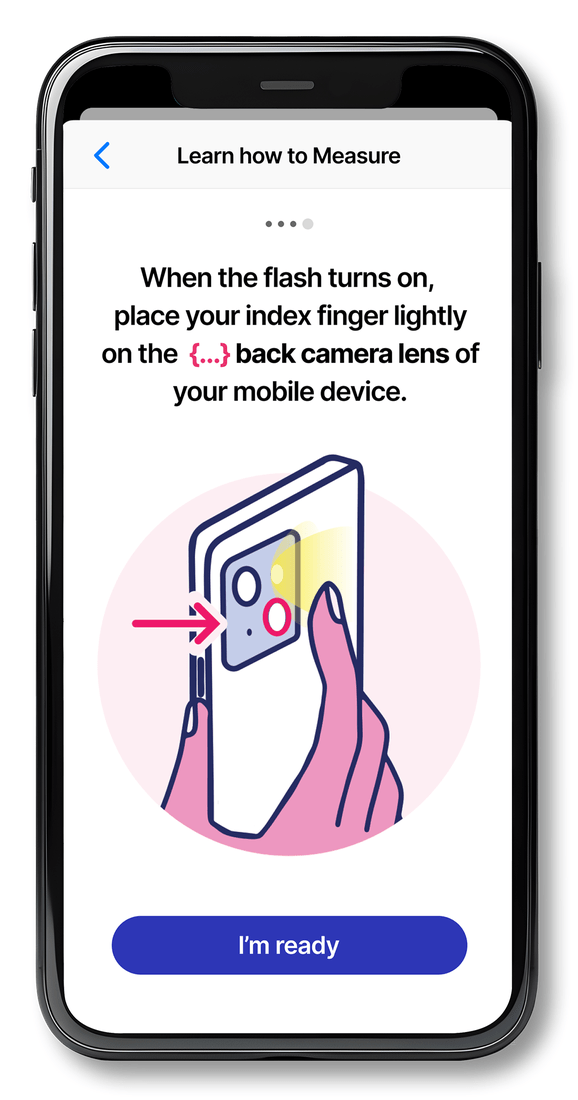
- Instructions present the user with instructions on how to perform an accurate heart rate measurement as shown below.

- Measurement: At the start of the measurement, the user is instructed how to place their finger and the app starts to calibrate in order to get the right measurement. The app takes 1.5-2 minutes to conduct a measurement, the user is advised to stay still during the measurement. At the end of the measurement, the telehealth organization is provided with a result that they can communicate to the end-user.

How Heart Rhythm SDK Works
Through the technology of photoplethysmography (PPG), which is an optical technique that measures light reflected in the blood, the Heart Rhythm SDK detects volumetric changes in blood in peripheral circulation at the surface of the skin. The Heart Rhythm SDK uses the smartphone camera to gather raw PPG data. The raw PPG data is used as input for the Heart Rhythm SDK to process the information. After the Heart Rhythm SDK processes the information, the measurement results (heart rate, heart rate variability, and heart rhythm) are shared with the user.
Recommendations
General
This Instruction for Use (IFU) deals with the specifications, operation, and maintenance of the Heart Rhythm SDK medical software. Happitech is by no means responsible for any malfunction or accident arising from a user ignoring the instructions for use and maintenance described in this IFU.
This IFU contains a description of all the functions available, please read this IFU carefully and familiarize yourself thoroughly with its contents before operating the unit. If any technical problem should arise, please contact Happitech technical support at contact@happitech.com.
Heart Rhythm SDK has no known side effects.
Residual Risks
All risk control measures have been implemented and verified. All identified risks have been reviewed and reduced to an acceptable level. Some risks remain as residual risks, and are described below.
- If you are experiencing complaints, please contact your healthcare professional regardless of the result.
- Please follow the digital health company’s instructions for downloading and updating the application and for sending your measurement.
- Please be aware of security vulnerabilities on the internet. Protect your smartphone or tablet against malware and ransomware.
- Please read the full contents of these Instructions for Use carefully before use.
- Despite the implemented cybersecurity measures, residual risks remain, including potential unauthorized access to data if the device is used on a compromised or unsecured system. Operate the application only on secure, unmodified devices with an up-to-date operating system.
- A result provided by Heart Rhythm SDK is not a diagnosis. Any result requires confirmation and interpretation by a qualified healthcare professional.
Warnings
- User needs to remain as still as possible during the measurement ideally seated;
- Where a person uses medication or an implanted device that regularizes the heartbeat, the pulse will also appear regular and the rhythm result may be unreliable. Such use falls outside the intended patient population. See Intended Patient Population, Limitations of Use.
- User should interrupt measurement if LED is too hot;
- User should remove phone case while using Heart Rhythm SDK to avoid heat accumulation;
- User finger should be properly positioned before measurement;
- User shouldn’t move finger during measurement;
- User shouldn’t speak during measurement;
- If the battery level is less than 10%, recharge the battery and start the application;
- The user might need an internet connection during the measurement
- User should have mild to warm temperature hands for optimal measurement
- If the result is of low quality, the user should take another measurement
Contraindications
Heart Rhythm SDK is contraindicated for:
- Persons unable to follow the measurement instructions, due to excess movement or to an inability to read or hear the instructions.
- Persons with cold fingertips or low perfusion in the fingertips, as these conditions prevent a valid measurement and will display an “Insufficient Quality” warning.
Intended Users
Heart Rhythm SDK is intended for adult patients (18 years and older) who are suspected of having, or at risk for, atrial fibrillation, or who wish to monitor their general heart rhythm for health purposes. Users are expected to have access to a smartphone (iOS or Android) and basic familiarity with mobile applications. Users may have low to high levels of education and varying levels of technological proficiency.
The device is intended for use by the general population, including health-conscious individuals, patients with known or suspected heart conditions, and those interested in intermittent self-monitoring of heart rhythm.
Exclusions and limitations applicable to intended users are defined under Intended Patient Population, Limitations of Use.
Intended Patient population
Heart Rhythm SDK is intended for use by adult patients (18 years and older) with known or suspected cardiac arrhythmias, including atrial fibrillation. It may also be used by health-conscious individuals for self-monitoring of heart rhythm parameters, provided they understand the limitations of use.
The relevant patient groups include, but are not limited to:
- Patients with a diagnosis of atrial fibrillation who require intermittent rhythm monitoring.
- Patients suspected of having paroxysmal or persistent atrial fibrillation, including those referred by a healthcare professional for rhythm monitoring.
- Patients experiencing transient symptoms potentially suggestive of arrhythmia (e.g., palpitations, dizziness, lightheadedness, syncope of unknown origin, dyspnea).
- Patients undergoing treatment where monitoring of rhythm and rate control is clinically indicated (e.g., pharmacological therapy for atrial fibrillation).
- Patients recovering from cardiac surgery, interventional procedures, or cardioversion, where post-procedure rhythm monitoring is required.
- Undiagnosed individuals with risk factors for atrial fibrillation who may require screening.
Limitations of Use
- Persons under the age of 18 years.
- Persons with implanted cardiac devices (e.g., pacemakers, implantable cardioverter-defibrillators) or taking medications that regularize the heartbeat, as pacing or rate regularization may confound rhythm detection.
- Persons with conditions that cause tremors or that prevent holding the hand still for at least 90 seconds (e.g., Parkinson’s disease, dementia), which may prevent accurate measurement.
- Persons unable to follow the measurement instructions, whether due to excess movement or to a physical or cognitive limitation affecting the ability to read or hear instructions.
- Persons with reduced peripheral blood flow in the fingertips (e.g., perniosis, callus formation), cold fingers, or recent exposure to a cold environment, as these conditions may prevent sufficient photoplethysmography signal detection.
- Users in critical care or life-threatening scenarios.
The following limitations apply to the use of the device:
- The device is not intended for continuous monitoring or for emergency medical use.
- The device measures pulse rhythm rather than heart rhythm, and may not capture all rhythm changes.
- Where signal quality is insufficient, including as a result of cold fingertips or low perfusion, the software displays an “Insufficient Quality” warning and no result is provided.
- Any medical diagnosis, treatment decision, or clinical intervention based on the data requires confirmation and interpretation by a qualified healthcare professional.
- Pregnant women are not restricted from using the device, but hormonal or hemodynamic changes during pregnancy may affect baseline heart rate variations and induce extra systoles, and users should consult a physician to assess if this is an appropriate technology for their symptoms.
Compatibility
Software requirements
Device and System Requirements / Limitations
Minimum Requirements
- Operating system: iOS version 13.0 or higher; Android version 8.0 or higher.
- Hardware: Sufficient processing speed and memory to support continuous PPG signal acquisition.
- Internet connection: Stable connection recommended for data upload and synchronization.
Performance Limitations
- Devices with weaker hardware, older operating systems, or lower-quality cameras may experience reduced performance.
- Poor lighting conditions or unstable internet connections may result in incomplete or delayed measurements.
- In such cases, users should repeat the measurement, check the network connection, or use a compatible device.
Internet Dependence
- Measurements can be performed locally without internet access; however, data upload and synchronization may be delayed or incomplete if the connection is unstable.
- Users should ensure a stable connection when transmitting data to digital health or telehealth platforms.
Integration with Third-Party Platforms
- Heart Rhythm SDK may be integrated with validated third-party digital health platforms.
- Use must be in accordance with the manufacturer’s instructions and the list of supported/validated systems.
- Integration with unvalidated platforms may limit functionality but does not compromise device safety when used correctly.
Hardware requirements
iOS
| iPhone 8 | iPhone 11 Pro Max | iPhone 14 Pro |
| iPhone 8 Plus | iPhone 12 | iPhone 14 Pro Max |
| iPhone SE 2nd Gen | iPhone 12 Mini | iPhone 15 |
| iPhone SE 3rd Gen | iPhone 12 Pro | iPhone 15 Plus |
| iPhone X Global | iPhone 12 Pro Max | iPhone 15 Pro |
| iPhone X GSM | iPhone 13 | iPhone 15 Pro Max |
| iPhone XR | iPhone 13 Mini | iPhone 16 |
| iPhone XS | iPhone 13 Pro | iPhone 16 Plus |
| iPhone XS Max Global | iPhone 13 Pro Max | iPhone 16 Pro |
| iPhone 11 | iPhone 14 | iPhone 16 Pro Max |
| iPhone 11 Pro | iPhone 14 Plus | iPhone 16e |
Android
| Fairphone 4 | Samsung Galaxy A20e | Samsung Galaxy A56 | Samsung Galaxy S23 FE |
| Google Pixel 6a | Samsung Galaxy A22 5G | Samsung Galaxy A6 (2018) | Samsung Galaxy S23 Ultra |
| Google Pixel 7 | Samsung Galaxy A23 5G | Samsung Galaxy A7 (2018) | Samsung Galaxy S23+ |
| Google Pixel 7a | Samsung Galaxy A25 | Samsung Galaxy A70 | Samsung Galaxy S24 |
| Google Pixel 8a | Samsung Galaxy A26 | Samsung Galaxy A71 | Samsung Galaxy S24 FE |
| Huawei P30 lite | Samsung Galaxy A32 | Samsung Galaxy A72 | Samsung Galaxy S24 Ultra |
| Motorola Moto G84 | Samsung Galaxy A32 5G | Samsung Galaxy A8 (2018) | Samsung Galaxy S24+ |
| ONEPLUS NORD | Samsung Galaxy A33 5G | Samsung Galaxy J6 | Samsung Galaxy S25 |
| OnePlus Nord 2T | Samsung Galaxy A34 | Samsung Galaxy S10 | Samsung Galaxy S25 Ultra |
| OnePlus Nord 4 | Samsung Galaxy A35 | Samsung Galaxy S10+ | Samsung Galaxy S25+ |
| Oppo A53s | Samsung Galaxy A36 | Samsung Galaxy S10e | Samsung Galaxy S8 |
| Samsung Galaxy A10 | Samsung Galaxy A40 | Samsung Galaxy S20 5G | Samsung Galaxy S9 |
| Samsung Galaxy A12 | Samsung Galaxy A41 | Samsung Galaxy S20 FE | Samsung Galaxy S9+ |
| Samsung Galaxy A12 NACHO | Samsung Galaxy A42 5G | Samsung Galaxy S20 FE 5G | Samsung Galaxy Xcover 5 |
| Samsung Galaxy A13 | Samsung Galaxy A5 (2017) | Samsung Galaxy S20+ 5G | Samsung Galaxy Z Flip5 |
| Samsung Galaxy A13 (SM-A137) | Samsung Galaxy A50 | Samsung Galaxy S21 5G | Samsung Galaxy Z Flip6 |
| Samsung Galaxy A13 5G | Samsung Galaxy A51 | Samsung Galaxy S21 FE 5G | |
| Samsung Galaxy A14 | Samsung Galaxy A52 | Samsung Galaxy S21 Ultra 5G | |
| Samsung Galaxy A14 5G | Samsung Galaxy A52 5G | Samsung Galaxy S21+ 5G | |
| Samsung Galaxy A15 | Samsung Galaxy A52S 5G | Samsung Galaxy S22 5G | |
| Samsung Galaxy A15 5G | Samsung Galaxy A53 5G | Samsung Galaxy S22 Ultra 5G | |
| Samsung Galaxy A16 | Samsung Galaxy A54 | Samsung Galaxy S22+ 5G | |
| Samsung Galaxy A16 5G | Samsung Galaxy A55 | Samsung Galaxy S23 |
Product Installation
For Telehealth Users:
If you’re using this medical device through a telehealth organization, please follow the organization’s instructions for installing, logging in, and accessing the Heart Rhythm SDK within their app. Refer to the installation guide provided by the telehealth organization.
For Non-Telehealth Users:
If you’re using this device independently of a telehealth platform, you can download the app from the Apple App Store or Google Play Store by searching for “Happitech Heart Rhythm App.” Ensure you have a stable internet connection for the download. Once installed, open the app to access the Heart Rhythm SDK.
Product Specifications
The Heart Rhythm SDK’s current version number, build number, and release date can be located underneath the label inside the SDK on the contact screen.

Heart Rhythm SDK Measurement
Performing a measurement
Click on the Digital Health App icon to open their app and follow their instructions to open the Heart Rhythm SDK. You will be asked if you are currently experiencing any cardiac symptoms and to indicate your symptoms. The screens then guide you to perform a sound check and to request access to the smartphone camera.
Before the measurement starts, a short tutorial of 4 screens provides clear instructions on how to create an optimal environment for measuring. After the tutorial, you will be instructed on what camera lens to place your finger. The SDK will automatically detect what type of smartphone and correct camera lens is used for the measurement. A custom animation is shown to guide you to the correct camera lens on the smartphone in addition to a visual viewer where you can see visual feedback on where your finger is being placed. Once the correct finger placement has been detected you will be requested to turn your phone upside down with your finger on the camera lens and to sit comfortably.
The voice guidance will inform the you that the measurement has started. Throughout the duration of the measurement, the voice guidance will provide you with the time remaining, along with any corrective actions that are needed during the measurement.
You will have to keep their finger on the smartphone camera lens for 90 seconds. Once the measurement is completed, you will be alerted by voice guidance that the measurement is complete.




Results You Might See
After you complete a measurement, you will see one of the following results on the results screen.
Heart Rhythm Regular – A message screen stating that at the moment the heart rhythm is currently regular and that no Atrial Fibrillation is detected. The user is instructed in case of complaints, to always contact their physician.
Heart Rhythm Irregular Suggestive of Atrial Fibrillation – A message screen stating that at the moment the heart rhythm is irregular and is suggestive of Atrial Fibrillation. The user is instructed to contact their physician for a follow-up checkup.
Heart Rhythm Inconclusive – A message screen stating that at the moment the heart rhythm is inconclusive which means that the app can not interpret your heart rhythm. The user is instructed to contact their physician for a follow-up checkup.
An irregular rhythm result means your heartbeat pattern appears irregular. AFib is an irregular heart rhythm caused by your heart’s upper and lower chambers not beating in sync. You should speak with your doctor if you receive an unexpected AFib rhythm result. Left untreated, AFib can lead to serious health consequences. An irregular heart rhythm causes improper blood flow in the heart, which can lead to stroke, heart failure, and/or other medical problems.
AFib can be temporary or persistent, but it is a manageable condition when treated by a doctor and with medication.
Many people with AFib live healthy lives. Sometimes people with AFib do not have symptoms. However, others may experience one or more of these common symptoms:
- Rapid heartbeat (pounding, fluttering)
- Skipped heartbeat
- Fatigue
- Shortness of breath
- Chest tightness or pain
- Fainting
- Dizziness
Errors you Might See
- First No Finger Detected error
- This error screen is shown when you have not placed your finger on the correct camera lens after the first forty-five (45) seconds. This error screen will instruct you how to properly place your finger.
- Final No Finger Detected error
- This error screen is shown when you remove your finger from the camera lens for more than five (5) seconds during a 90 second measurement or if you have not placed your finger after the first forty-five (45) seconds once the measurement has started.
- Too Much Movement error
- This error screen is shown when you have too much movement during the measurement and the data received is of insufficient quality. This could be caused by your hands shaking throughout the measurement or by you or your phone moving during the measurement.
- Insufficient Quality error
- This error screen is presented when the signal of the measurement is of insufficient quality. You are recommended to perform the measurement again following the instructions carefully, and to not take a measurement with cold hands. This error could appear for a couple of different reasons as bad lighting, cold fingers, and too much or too little pressure on the camera lens.
- Measurement Interrupted error
- This error screen is shown when during the measurement you have any type of system interruption: incoming calls, low battery alert, etc., or the application closing/minimizing, you clicking on the Back button while measurement is ongoing, or you pull the top system menu down the measurement will be interrupted.
- Final error
- This error screen is shown after you have three (3) unsuccessful attempts. After three (3) unsuccessful measurements you are requested to take a measurement at a later time and to read the instructions carefully.
Messages/Indicators
| INDICATOR | MEANING |
|---|---|
| Please accept access to Camera and Video | Access is needed for using the video camera to measure your heart rhythm |
| Please sit still and do not move | The quality of the measurement is affected during movement. It is advised to stay as still as possible during the measurement. |
| Please do not press on the camera lens | The quality of the measurement is affected when pressing on the camera lens. Lay your finger gently on the camera lens. |
| Battery too low | The quality of the measurement is affected when the battery is running low. Charge your phone to over 10% |
Error Codes
Heart Rhythm SDK has no alarms.
| Code | Message | Meaning |
|---|---|---|
| ERROR-1 | FINGER_ERROR | User has not placed finger correctly for 30 seconds |
| ERROR – 2 | CAMERA_HAS_NO_PERMISSION | User has not given the app permission to access camera |
| ERROR – 3 | BAD_FINGER_POSITION | User has not places finger fully on the camera lens for an extended period of time. |
| ERROR – 4 | TOO_MUCH_MOVEMENT | User is moving too much. |
Maintenance
Happitech will provide updates to the app upon big changes in the operating Apple and Android operating system at least 1 time a year. Moreover upon introduction of a new special camera, the devices are tested and added to the included devices.
Troubleshooting
Troubleshooting table
| Observation | Potential Cause | Action |
|---|---|---|
| No Camera access | Pressed no access to the Camera | Settings -> Apps -> Camera Access |
| Measurement won’t start | Portrait Orientation Locked | Unlock Portrait orientation |
| Battery Low | Battery percentage below 10% | Please charge the phone |
Contact Details
For more information or questions, please contact us at contact@happitech.com
In case of injury or serious incidents that have occurred in relation to the device must be reported to:
(1) the legal manufacturer via contact@happitech.com
(2) the local competent authority
Symbols
| Symbol | Title/ Meaning | Function/ Description |
|---|---|---|
 |
Operator’s manual; operating instructions | To identify the location where the operator’s manual is stored or to identify information that relates to the operating instructions. To indicate that the operating instructions should be considered when operating the device or control close to where the symbol is placed. |
 |
CE approved product | Mark of conformity according to the European Medical Device Regulation (EU) 2017/745 , stating the manufacturer’s Notified Body. |
 |
Manufacturer | To identify the manufacturer of a product. This symbol shall be used filled in all applications to differentiate it from ISO 7000-2497 |
 |
Medical Device | Indicates the item is a medical device |
 |
Catalog number | Indicates the manufacturer’s catalog number so that the medical device can be identified |
 |
Date of Manufacture | Indicates the date when the medical device was manufactured. |
 |
Patient information website | Indicates a website where a patient can obtain additional information on the medical product. |
 |
Unique device identifier | Indicates a carrier that contains unique device identifier information |
Regulations and standards
Medical software Heart Rhythm SDK is classified according to MDR Annex VIII Class IIa, Rule 11. Heart Rhythm SDK is classified as Class B according to IEC 62304:2006/A1:2015 – Medical device software — Software life cycle processes. The device complies with the following product standards:
- IEC 62304:2006/A1:2015 – Medical device software – Software life cycle processes
- EN 62304:2006/AC:2008 – Medical device software — Software life cycle processes
- ISO 13485:2016 – Medical devices – Quality management systems – Requirements for regulatory purposes
- FDA QSR 21 CFR Part 820 – Medical Devices – Quality System Regulation
- IEC 82304-1:2016 – Health Software – Part 1: General requirements for product safety
- Medical Device Regulation – Regulation (EU) 2017/745 of the European Parliament and of the Council of 5 April 2017 (MDR)
- EN ISO 14971:2019 – Medical devices — Application of risk management to medical devices
- IEC 62366-1:2015 – Medical devices – Part 1: Application of usability engineering to medical devices
- ISO 15223-1:2021 – Medical devices – Symbols to be used with medical device labels, labeling and information to be supplied – Part 1: General requirements
- EN ISO 15223-1:2021 – Medical devices – Symbols to be used with medical device labels, labeling and information to be supplied – Part 1: General requirements

Happitech
Address: Happitech B.V., Stationsplein 45, floor A4.004, 3013 AK Rotterdam, NL
Phone: +316-8188565
Email: contact@happitech.com
Website: www.happitech.com